
Every vial accounted for, from lot to customer.
Vial Workspace is inventory and order software for research-vial businesses. Lots, COAs, orders, payments and shipping live in one set of records, on your own PC.
7 days with every feature. No card, no account. Windows 10 and 11.
Today
Friday 9 October · 10 things need attention
- Orders to enter
- 2
- Ready to pack
- 3
- Awaiting payment
- $1,2402 orders
- Lots needing review
- 1
- Low stock
- 2
Ready to pack oldest first
- ORD-1138Blue Ridge Lab Supply30 vials · Lot VL-2601 · paidView packing details
- ORD-1141Halden Research12 vials · Lot VL-2598 · paidView packing details
- ORD-1143Corvane Bio6 vials · Lot VL-2603 · paidView packing details
Lots needing review
- VL-2604COA attachedPurity result missing on the certificateReview
Month to date owner only
- Revenue$18,420.00
- Gross profit64.6% margin$11,906.40
Today
Order entry · 4 orders need you
- Orders to enter
- 2
- Awaiting payment
- $1,2402 orders
- Ready to pack
- 3
Orders to enter
- ORD-1144Northline ResearchNo products added yetAdd products
- ORD-1145Pell & Ash LabsNo research-use agreement on fileAgreement
Awaiting payment
- ORD-1139Ostrava LabsInvoiced 6 days ago$840.00
- ORD-1142Halden ResearchInvoiced 2 days ago$400.00
Costs and profit are hidden for this role unless the owner allows them.
Today
Shipping · 3 boxes to pack
- Ready to pack
- 3
- Need a look first
- 1
- Shipped today
- 4
- To receive
- 1
Ready to pack oldest first
- ORD-1138Blue Ridge Lab Supply30 vials · Lot VL-2601 · COA attachedView packing details
- ORD-1141Halden Research12 vials · Lot VL-2598 · COA attachedView packing details
- ORD-1143Corvane Bio6 vials · Lot VL-2603 · COA attachedView packing details
Need a look first
- ORD-1140Meridian AssayNo shipping addressBlocked
To receive
- VL-2605250 vialsSupplier order due todayExpected
Shipping never sees prices, costs or profit.
Switch roles to see how each person's Today screen changes. Records shown are fictional.
Follow one lot all the way to the customer.
Stock, certificates, orders and money are the same records, so a lot number answers every question about where a vial went and what it earned.
-
1Receive
Bring in the lot
Record the vials and the loaded cost, including freight and testing. Attach the COA and the app reads the results from it.
- Lot
- VL-2601
- Received
- 250 vials
- Loaded cost
- $11.84 / vial
- COA
- Attached
-
2Sell
Take the order
Pick the customer and the product. The lot is chosen for you, oldest stock first, and only from lots that have it.
- Order
- ORD-1138
- Customer
- Blue Ridge Lab Supply
- From lot
- VL-2601
- Quantity
- 30 vials
-
3Pack and ship
Check every line into the box
Tick each line as it is packed, print the packing slip, add a photo and the tracking number.
- Pick and check
- 1 of 1 packed
- Packing photo
- Saved
- Carrier
- UPS
- Status
- Shipped
-
4Know the margin
See what it earned
Payment, cost of goods and gross profit land on the order, then roll into your P&L.
- Revenue
- $1,350.00
- Cost of goods
- $355.20
- Gross profit
- $994.80
- Margin
- 73.7%
Built for the way a vial business actually runs.
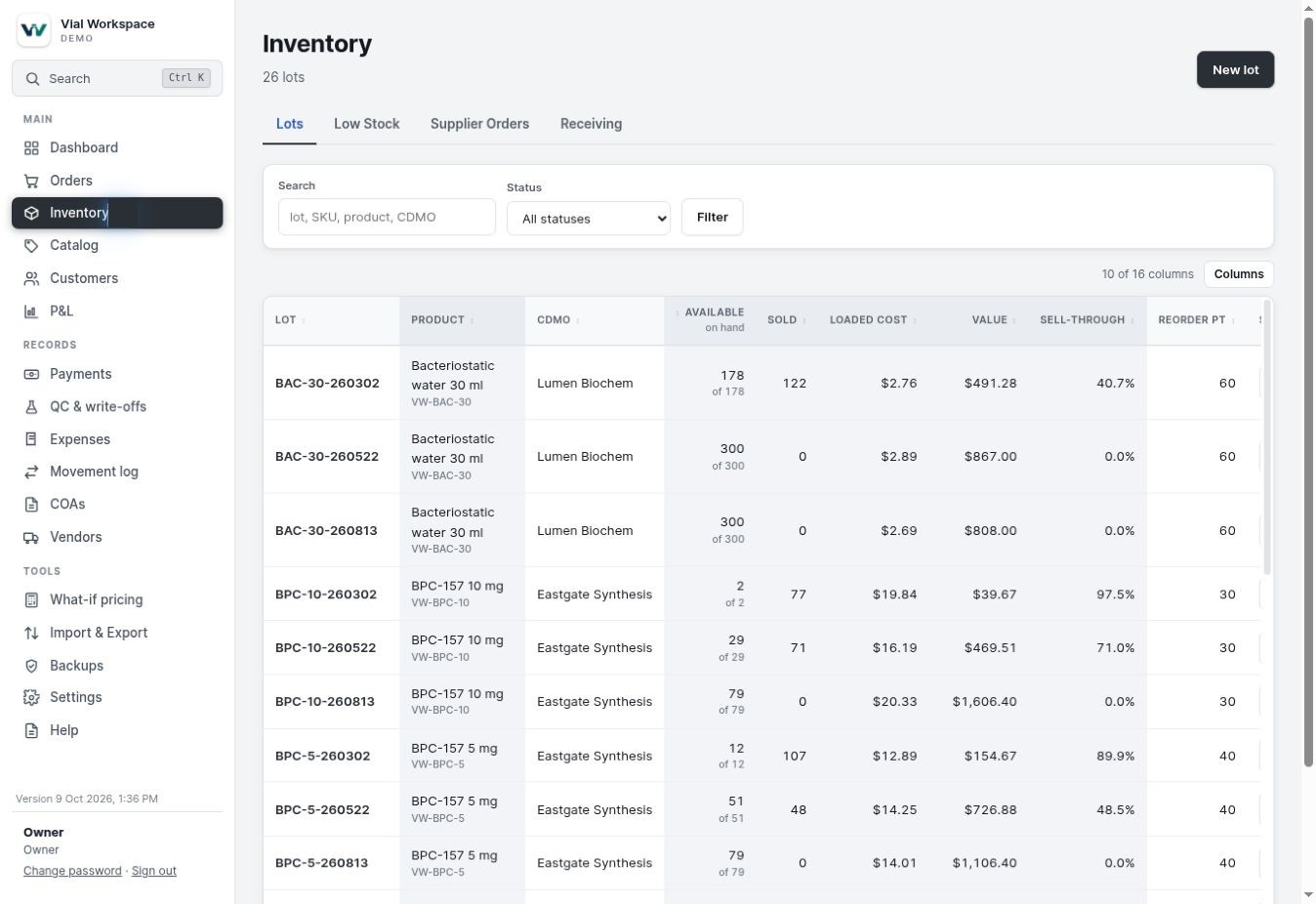
Lots and COAs you can trust
See what is available, what is reserved and what is about to expire, lot by lot.
- COA PDFs are read for you, with a warning when a result is missing or fails
- Quarantine, QC and write-offs, with a movement log for every vial
- Low stock alerts and supplier orders
- Scanned certificates and lab links read tooPro
Orders, payments and invoices in one place
Every order shows what was paid, what is owed and what it made, line by line.
- Payments with proof attached, invoices and customer statements
- Research-use agreements kept on each customer
- Promo codes, refunds, reships and repeat orders
- Wholesale price lists and affiliate commissionsPro
ORD-1138
Blue Ridge Lab Supply · 2 October
- Order total
- $1,350.00
- Paid
- $1,350.00
- Balance due
- $0.00
- Gross profit
- $994.80
| Product | Lot | Qty | Unit | Margin |
|---|---|---|---|---|
| Reference compound A, 10 mg | VL-2601 | 30 | $45.00 | 73.7% |
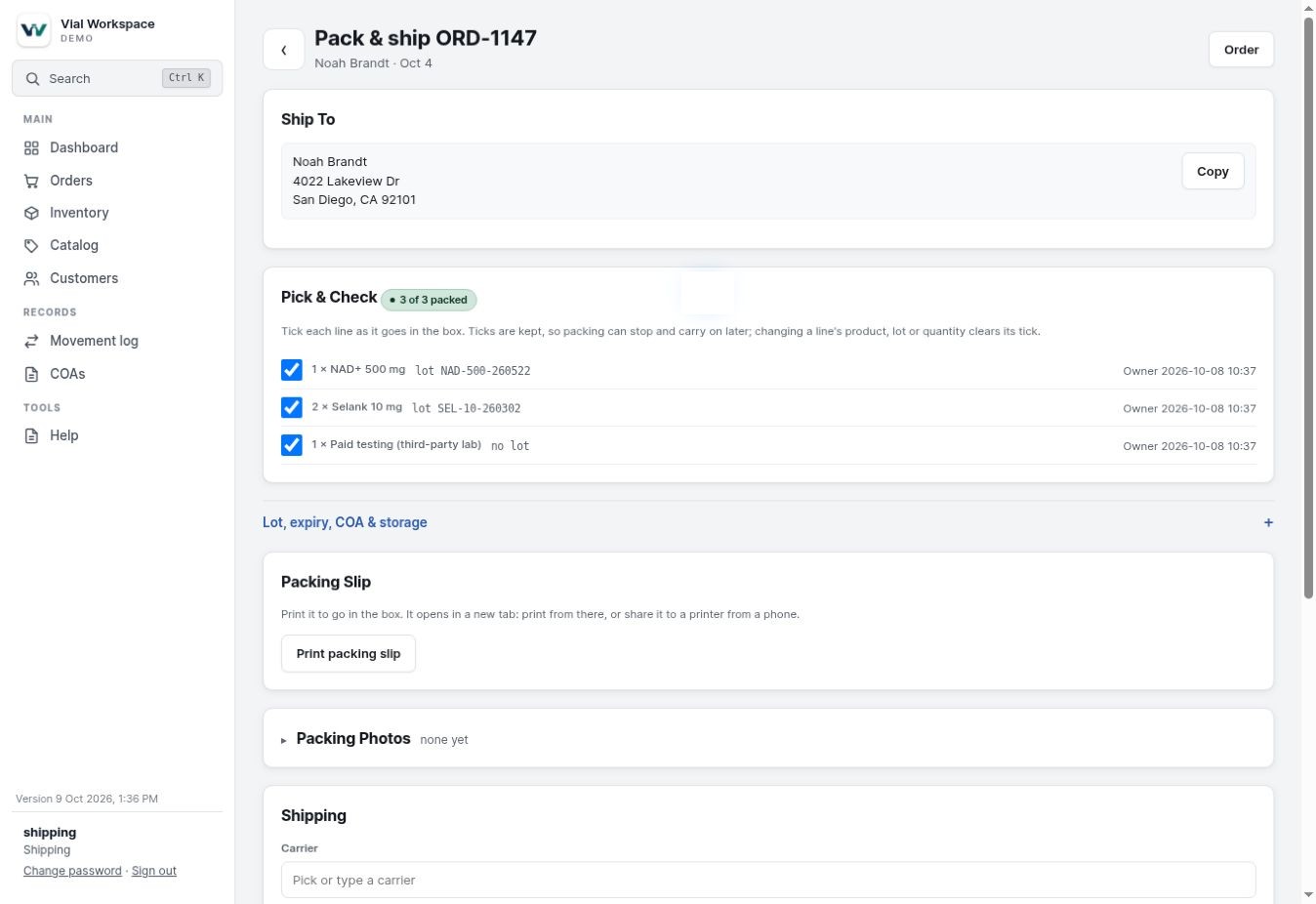
Packing that checks itself
A shipping queue ordered by who has waited longest, and a pack page that leaves nothing out of the box.
- Pick and check ticks that are kept if packing stops halfway
- Packing slips, packing photos, tracking, reships and insurance claims
- Orders missing an address, payment or agreement are held back
- Pirate Ship and ShipStation files, tracking emailsPro
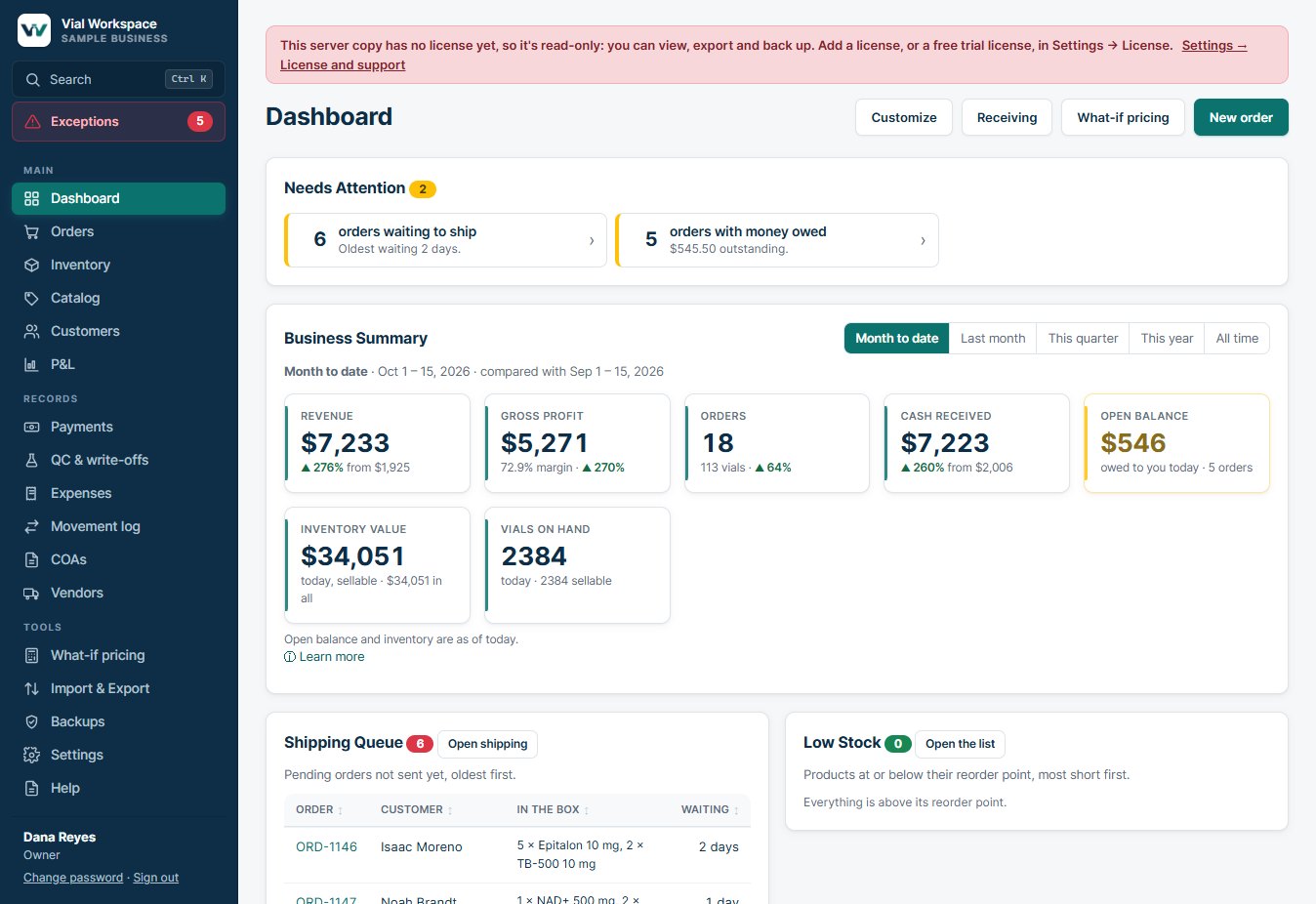
Know where the money is
Revenue, gross profit, cash received and stock value on one screen, compared with last month.
- Profit and loss, expenses and receipts
- Sales by state, with a warning as you near a tax threshold
- What-if pricing before you change a price
- Per-state tax rates and exemption certificatesPro
And the rest of the working day.
The jobs around an order are already in the same records, so there is nothing to copy between tools.
Your online storePro
Connect a WooCommerce store. Paid orders come in by themselves, stock and coupons stay in step, and the store is told when an order ships.
Group-buy forms
Bring past orders in from JotForm and EZForms exports, matched to your products and customers, without taking stock from your lots.
Vials or kits
Sell a product by the vial, by the kit or either. Prices follow the kit, and stock, cost and profit stay counted in vials.
Supplier orders
Order kits, receive part deliveries into new lots, and open a claim for anything damaged or short, from the Low stock list.
Lab reports on every lot
Keep each report from the lab with its results. The app flags a failed test, low purity or less peptide than the label says, before you sell.
COAs for your customersPro
Publish only the COAs you choose. Each order gets a private lab-results page, with a QR code on the packing slip.
Refunds and store credit
Record money back, store credit or vials returned to stock. Revenue, cost and the lot's count all follow.
Invoices and statements
Numbered invoices and customer statements as PDFs, with due dates and overdue flags. Email them from your own account with Pro.
The real profit
Loaded cost, payment fees and postage are counted per order. Sales tax is kept out of revenue and tracked by state.
Your customers' privacy
Download everything you hold about one customer, or remove their personal details while your books and tax records stay right.
Only what you use
Switch off the parts you don't need, such as price lists or promo codes, and their menus disappear. Nothing is deleted.
Safe updates
Update from inside the app. It backs up first, accepts only signed updates, and can go back to the previous version.
A home screen for every job.
Everyone signs in with their own account. What they see and what they can change follows their role, and the app checks it on every save.
| Role | Their Today screen | Costs and profit | Users and settings |
|---|---|---|---|
| Owner | Everything that needs attention, plus revenue, profit and stock value | Visible | Manages |
| Manager | Operations, inventory, COAs, prices and reports | Visible | No |
| Order entry | Orders to enter, awaiting payment, customers | Owner decides | No |
| Shipping | Ready to pack, need a look first, receiving | Hidden | No |
| Read-only | View records; export only if the owner allows | Owner decides | No |
Users and roles are part of Pro. Standard is for one person on one PC.
Your records stay on your computer.
Vial Workspace is not a cloud service. Orders, customers and stock live in one data folder that you can back up, copy or move whenever you like.
Works offline
The app goes online only when you ask it to, such as sending an email or checking for an update.
Locked backups
Protect full backups with your own password. They are encrypted with AES-256, and the app keeps nothing that can open them.
2-step sign-in
Add a code from an authenticator app for each person. It works offline and is included on every license.
No tracking, no card numbers
No usage data or analytics are sent to us, and card details are never stored. Payments record only the method, amount and proof.
Start with the trial. Choose an edition when it has earned its place.
The trial is the full Pro edition for 7 days, on your own records.
Free 7-day trial
Every Pro feature, no record limits. Import your workbook and run a real week of orders through it.
Standard
For one person running the business on one PC.
- Orders, payments, invoices and statements
- Lots, loaded cost, receiving, QC and write-offs
- COA files with automatic reading of PDF results
- Shipping queue, packing slips, photos and tracking
- Profit and loss, sales by state, what-if pricing
- Locked backups, 2-step sign-in, Excel import and export
Pro
For a growing business with staff, phones and more than one computer.
Everything in Standard, plus:
- Users, the five roles and an audit log
- Phones, other PCs and running on a NAS
- Emailing invoices, statements and tracking from the app
- Pirate Ship and ShipStation files, tracking import
- Scanned COAs, lab links and COA QR codes on packing slips
- Price lists, affiliates, per-state tax and reconciliation
- WooCommerce store connection
- Sharing COAs with customers and a weekly summary email
One-year licenceEach licence runs for a year and is checked on your PC, not online.
Your data is never held backIf a licence lapses, the app becomes read-only: you can still view, export and back up everything.
Keep what you enteredBuying after the trial unlocks the same copy. Nothing needs to be entered again.
Moving from another system? We can do it for you.
The app imports your records itself, and you can do that yourself for free. If you would rather hand it over, data migration is available as an extra service.
Extra cost: quoted for each job, with the price confirmed before any work starts.
What can come across
- Customers, products and lots with their costs and COAs
- Past orders, payments, refunds and store credit
- Expenses, price lists and promo codes
- From spreadsheets, JotForm and EZForms exports, or a WooCommerce store
How it works
- You send what you have. Spreadsheets or exports from your old system. You choose what to send.
- We load it and check it. Every row is tried first, and the totals are compared with your old system so nothing goes missing.
- You review the result. You look through your own records and sign them off before you start using them.
- We delete your files. When the job is done, we delete every file you sent us.
Questions before you download
What do I need to run it?
A Windows 10 or 11 PC (64-bit) and a folder you can write to. The app runs from that folder with no installer. With Pro it can also run on a NAS, so phones and other computers can sign in.
Can I bring my existing spreadsheet?
Yes. The app imports an Excel workbook of lots, products, customers and orders in its supported layout, and shows a preview before anything is saved. Other spreadsheets may need some tidying first.
What happens when the trial ends?
If you haven't bought a licence, the app becomes read-only. Your records stay viewable and exportable, and nothing is deleted. Add a licence and everything carries on where you left it.
Can my staff have their own logins?
With Pro, yes. Each person gets a username and one of five roles: Owner, Manager, Order entry, Shipping or Read-only. Shipping never sees costs or profit; for Order entry and Read-only it is the owner's choice.
Is my business data stored online?
No. The database, COAs, receipts and packing photos stay on your PC or NAS. We never receive them, and the app sends no usage data.
Can you move my data over for me?
Yes, as an extra service quoted for each job. You can also import your own spreadsheet at no extra cost: the app shows a preview and tries every row before anything is saved. About data migration.
Does it connect to my online store?
With Pro, it connects to a WooCommerce store using a key you create in WordPress. Paid orders come in every 15 minutes, products are matched by SKU, and the store is marked completed with the tracking number when you ship. Orders from JotForm and EZForms exports can be imported in any edition.
Can I lock my backups with a password?
Yes, in every edition. Set a backup password and every full backup, including the automatic ones, is encrypted with it. The app keeps nothing that can open them, so write the password down: if it is lost, nobody can open those backups.
Who is it for?
Small research-use-only vial businesses that buy lots from manufacturers, keep certificates of analysis and sell to labs and researchers. It records compound identity, strength, purity and storage only.
Put your lots, orders and margins in one place this week.
Download the trial, import your workbook and pack your next order with the lot, the customer and the money already connected.